Analysing paddocks on triangle grid
Considerations and specifications
Researching level shapes
Generator considerations
Data structures
Abstract
The Paddocks Puzzle’s grid (of arbitrary size) consists of triangular cells:
 Posts are located at the corner points.
Each fence is placed between 2 posts.

Instead of creating puzzles manually, a generator shall spit out plausible levels according to the rules...
Set fences between posts to create enclosed paddock areas.
- Every post connects exactly 3 fences.
- Each area of 2 or more cells contains their number.
Single-cell paddocks show no number.
So we need to find a decent algorithm. As always, solution uniqueness and difficulty parametrization are optional.
Basic idea: If an empty level’s boundary were defined, we could loop through all involved posts and give them (random) fences as needed.
Best to start with a bit of research…
Example
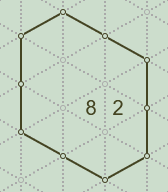 Initially, a puzzle shows an outer fence and all paddock size numbers (greater than 1, as stated in the rules).
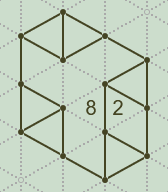 After setting mandatory fences, the (unique) solution is reached.
Minimal viable level
To gain some insight, it usually helps to construct a smallest possible puzzle.
 We start with a complete (3-fence) post.
Let’s go clockwise, and focus on the post on top.
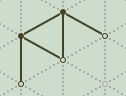 It needed 2 more fences... now they’re added.
A neat roof shape with extension points at the bottom.
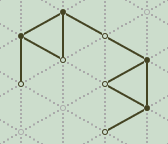 Continue by plugging a rotated copy?
 And another one to close the corral.
Now the 6 remaining incomplete posts each need a fence.
 It’s easy to resolve by connecting them pairwise - in either direction due to symmetry.
Turns out, this is in fact the most compact layout possible.
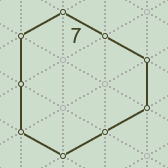 To make it a puzzle, the size number 7 must be shown.
By avoiding the ambiguous 4 inner cells, and placing it in one of the paddock’s 3 perimeter cells, the solution will be forced (and therefore unique).
Extending (by roofs)
Apart from how the minimal level looks, we haven’t learned much so far.
How about trying to extend it by using that basic roof shape from above?
 It would fit at the bottom, but there's too many fences now.
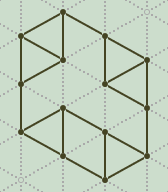 Removing the 2 superfluous fences made it valid.
Begs the question: does adding a roof always work?
On closer look, since the roof has a contact footprint of 1-2-1 (fences), it matches all borders that exhibit an inverse 2-1-2 footprint after removing 2 outer fences, and that pattern exists all around the periphery.
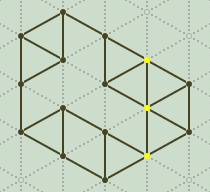 Let’s glue one to the right side.
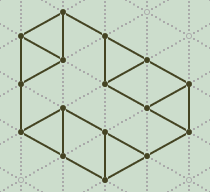 Again, after removal of 2 fences, it's fine.
This method of glue & repair is apparently a reliable way to grow our structure.
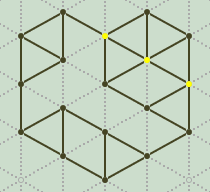 And just for fun, let’s make a heart.
 Done.
Done.
However, isn't there a quick method of deciding whether a certain level shape can be properly populated by fences?
Further research is needed…
Backbone
 Exploring a pipe of minimal (2 triangle rows) width…
What's its minimal length?
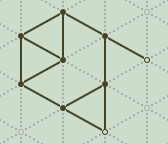 After the mandatory fences are set, we spot the open end having a 1-2 (fences) footprint.
Wait a sec. Couldn't we simply…
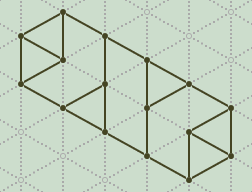 … plug a rotated (by 180°) copy?
Yessir.
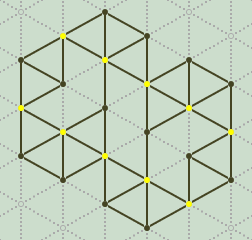 And that, for lack of better ideas, is another basis to glue roofs onto.
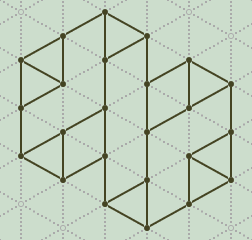 Nice.
Nice.
I wonder if those side gaps could be closed without much hassle.
 Looks a bit harder to repair this time…
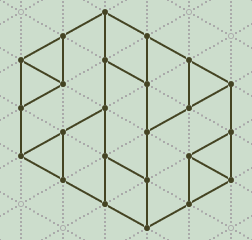 … but luckily it wasn't too difficult; just 2 fences (per side) had to be edited.
Finally a tad glimpse. Altering the level shape by adding or removing fences seems to work as long as the number of posts stays the same. Interesting.
Valid shape properties
After inspecting statistical features, we can make an unexpectedly simple observation:
A level shape is valid if the number of involved posts is even.
Of course, there's additional minor requirements:
- Thorns (single-cell protrusions) aren't allowed, because the post at the tip would be connected to only 2 fences.
- As seen above in the minimal viable level, a structure needs at least 12 posts.
- Inspired by the backbone shape, thickness should be at least 2 cell layers for optical reasons.
Level size
Our puzzle viewer/editor currently supports sizes up to 20×31 cells (bounding box), which should suffice for a casual game.
Width and height (perhaps effective area directly) may be tunable via sliders in a settings dialogue, where optionally also a select box with shape types…
- rectangular
- symmetric (rotational, mirrored)
- random (freestyle)
… could be offered.
Difficulty
A player will automatically pick the low hanging fruits:
- setting the mandatory (3rd) fences in corners
- setting (paddock divider) fences between touching numbered cells
An obvious way to make a level harder is to make it bigger, so the easy corners’ influence on the inner area is diminished.
Another way is to remove borders/corners by creating a seamless (scrollable) level, either horizontally, vertically, or both. Such a mechanism, however, is probably an unnecessary complication, not only for players, but also for generator and render engine.
At least the probability of touching numbered cells could easily be adjusted in the settings.
Memory map
For a convenient internal management (via array) of cellular structures, we need a view to access them in an accordingly organized manner.
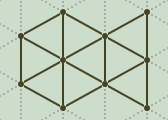 Let’s take, for example, this fish-shaped structure.
Mapping triangular cells to an orthogonal grid looks wonky but is actually straightforward:
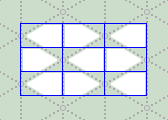 If we squint, it becomes clear that the cells are organized in rows and columns, with their orientation layout (pointing left/right) akin to a checkerboard.
Ortho-grid representation
In cardinal directions, a virtually square ortho-cell sees its 3 confining fences (above, below, side), plus 1 post (tip side).
The remaining 2 posts of the actual triangle reside in the rows above and below (its vertical fence).
Memory map : Ortho-grid
As an example, the minimal viable puzzle in orthogonal view:
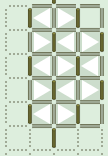 Its gross size is 3×5 cells, but based on the storage method used, we'll need additional cells: 1 column to the left, and (at least) 1 footer row - requiring the main array to be of size 4×6 in this case.
Memory map : Puzzle data
The main array holds immutable information about shape, fence convertibility, and size numbers.
bit fedcba98 76543210
    .......o nnnnbbee
e: editable flag bit.0=fence.top
            flag bit.1=fence.right
b: border   flag bit.2=fence.top
            flag bit.3=fence.right
n: number   int [0...15]
o: outback  flag 0=outside 1=inside level
Flags for editable are used by the edit function.
Flags for border and outback are used for initial rendering only.
Memory map : User data
The user array holds mutable information about the state of inner fences, and number of fences attached to the post above the right side.
bit 76543210
    .ppprrtt
t: top   enum state of top fence
              0: none - no fence (undecided)
              1: On - placed fence
              2: Off - no fence (white marker for 'free')
r: right enum state of right fence
p: post  int  number [0...6] of attached fences
              Used for runtime rendering only
Memory map : Solution
This array, initially created by the generator, contains a valid solution, and is only used when the player clicks the [Solve] button.
bit 76543210
    ......rt
t: top   bit state of top fence
             0: none - no fence
             1: On - placed fence
r: right bit state of right fence
Since all involved posts will have the correct number of (3) fences attached anyway, no explicit post stats are needed here.
ASCII format
For import/export purposes we support a minimal ASCII representation, which is based on the orthogonal grid, hence consists of rows as well.
ASCII format : Puzzle
Values (separated by whitespace, typically blanks) are denoted as follows:
- Leading outback cell: "," comma
- Empty cell: "-" minus sign
- Numbered cell: number
Example 1
- -
- - -
- - -
- 8 2
- - -
, - -
Example 2
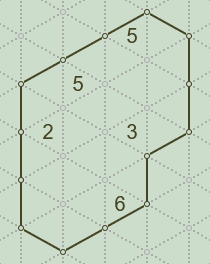
, , 5 -
, - - -
- 5 - -
- - - -
2 - 3 -
- - -
- - -
- - 6
- -
ASCII format : Solution
Values (separated by whitespace, typically blanks) are digits in the range [0…3], representing flag pairs.
| 0: 0b00 | 1: 0b01 | 2: 0b10 | 3: 0b11 |
| Cell has… |  |  |  |  |
| Bit 0: | … (tilted) fence on top | - | ✓ | - | ✓ |
| Bit 1: | vertical fence on the right | - | - | ✓ | ✓ |
Example 1
3 1
1 1 1
0 0 3
1 2 1
3 0 2
, 2 1
Example 2
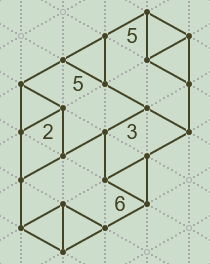
, , 3 1
, 3 0 3
1 1 0 1
1 0 1 2
3 0 1 1
0 3 0
1 0 3
0 0 1
3 1
Some values (in the top row, and in the rightmost column) will include fences that are part of the outer fence anyway, thus, contain redundant information. We ignore this to avoid edge case handling in write/parse functions.
Admittedly, for a human reader those values aren't exactly interpretable at a glance, but that's a good thing, because the solution isn't immediately spoiled.
ASCII format : Shorthand
A more compact (one-liner) format starts with the values for width and height.
They're followed by (optional) sequences of puzzle and solution characters (see above), without containing any whitespace.
Important encoding details
- Cell number values must be written in base36 ['0'…'z'] this time.
- Commas for trailing outback cells are required, except for the final row.
All parts (width, height, blocks) are separated by whitespace (typically blanks, or line-breaks).
Example 1
3 6 --,-------82---,-- 31,111003121302,21
Example 2
4 9
,,5-,----5------2-3----,---,--6,--
,,31,303110110123011030,103,001,31