SATOM - Strange Adventure Tales Of Morphland
Specifications • v0.17 Sep 2021
Abstract
Interface for visual, story-driven puzzle game genres (e.g. escape-the-room, or adventure), similar to the engine of Gorogoa.
Taylored for modern browsers on PC.
Folders & Files
+-[satom]
|
+-[aud] // optional: audio
|
+-[fnt] // optional: fonts
|
+-[img] // images
| |
| +-[c] // cursors
| | +-  0.png // default
| | +-
0.png // default
| | +-  1.png // pointer/hand
| | +-
1.png // pointer/hand
| | +-  2.png // move
| | +-
2.png // move
| | +-  3.png // hourglass
| |
| +-[i] // optional: inventory items
| | +- 0.png
| | +- 1.png
| | +- 2.png
| | …
| |
| +-[s] // scenes, masks, objects
| | +- 0.jpg
| | +- 1.jpg
| | +- 2.png
| | …
| |
| +- icon.png // favicon
| +-
3.png // hourglass
| |
| +-[i] // optional: inventory items
| | +- 0.png
| | +- 1.png
| | +- 2.png
| | …
| |
| +-[s] // scenes, masks, objects
| | +- 0.jpg
| | +- 1.jpg
| | +- 2.png
| | …
| |
| +- icon.png // favicon
| +-  d.png // button: direction
| +-
d.png // button: direction
| +-  e.png // button: end
| +-
e.png // button: end
| +-  f.png // button: forward/next
| +-
f.png // button: forward/next
| +-  i.png // button: info
| +-
i.png // button: info
| +-  o.png // button: out/minus
|
+- index.html
o.png // button: out/minus
|
+- index.html
Engine
The engine manages usage of Cards, and offers an optional Inventory.
The main area has 2 × 2 slots where cards can be placed (drag'n'drop) freely.
The inventory is a narrow panel on the left.
Cards
A card (420 × 420 px, including 10 px frame) is basically a container for either…
- … a scene (opaque image, 400 × 400 px)

of a story branch, or…
- … a mask / object (partially transparent PNG image).
 /
/ 
In case of cutscenes, or permanent animations, it may hold additional sprite images.
If needed, control buttons are layered on top.
Creation / removal of cards is pretty much a side-effect of masking.
Cards :: Control buttons
Buttons are assigned to 4 function types:
- Info
- Scrolling
- Zooming out
- Dialogue (speech bubbles) control, so the player can step/skip texts.
Positioning:
Cards :: Scene navigation
Depending on intended transition type, replacing a scene can be accomplished by…
- … control buttons,
- … clicking embedded areas, or
- … dragging the card (to another slot).
Cards :: Scene navigation :: Scroll
Triggered by pushing a scroll-button.
Often used in Gorogoa, and ETRs / adventures in general.
ExampleScene: Scroll right
…

…

…

…

Cards :: Scene navigation :: Zoom
Zoom in is triggered by clicking a square area in the scene.
Zoom out is triggered by pushing the zoom-out-button.
Often used in Gorogoa, and ETRs / adventures in general.
ExampleScene: Zoom in

…

…

…

…

Cards :: Scene navigation :: Wrap
Wrap is triggered by pushing the zoom-out-button.
Unwrap is triggered by clicking a square area in the scene.
Sometimes used in Gorogoa; not used in ETRs / adventures.
ExampleScene: Unwrap

…

…

…

…
Sidenote: Wrap and Unwrap are animated versions of masking, without needing or producing another card.
Cards :: Scene navigation :: Window
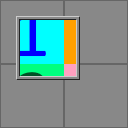
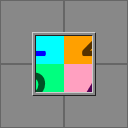
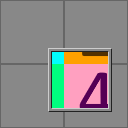
While dragging the card, a larger (820 × 820 px) background is revealed, like through a moving peephole.
Sometimes used in Gorogoa; not used in ETRs / adventures.
ExampleCard: Window

…
…
…
Cards :: Scene navigation :: Turn
Triggered by pushing the left or right scroll-button.
90° rotation (around Y-axis), especially to turn near room corners.
Not used in Gorogoa; rarely used in ETRs / adventures.
ExampleScene: Turn right
…

…

…

…
Cards :: Scene navigation :: Crossfade
When transitioning between scenes that can't be linked by scrolling or zooming.
Also allows for simple fade in / out.
Triggered by pushing a scroll-button, or the zoom-out-button.
Not used in Gorogoa; sometimes used in ETRs / adventures.
ExampleScene: Crossfade
…

…

…

…
Cards :: Scene navigation :: Match
Adjacent cards will highlight their touching frame borders if their content combines to a bigger scene.
Typically a cutscene preparation, where an avatar or object moves from one card to another.
Sometimes used in Gorogoa; not used in ETRs / adventures.
ExampleScene: Horizontal match

…

Cards :: Scene modification
Various effects, done via drag'n'drop of cards.
Cards :: Scene modification :: Masking
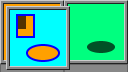
Removal / addition of frame-like scene parts (or the reverse: isolated scene objects) enables decent visual puzzles.
Often used in Gorogoa; not used in ETRs / adventures.
ExampleCard: Mask repositioning

…
…

…

…

Same goes for objects (technically being masks as well):
ExampleCard: Object repositioning

…
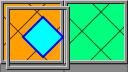
…

…

…

To avoid excess cards, it's possible to turn a scene into a mask / object directly. This transformation will only be revealed during dragging, though:
ExampleCard: Hidden mask revelation

…

ExampleCard: Hidden object revelation

…

Cards :: Scene modification :: Rotation
Changing a scene by rotating a background fragment (which doesn't have to be circular or centered).
Technically, the entire scene can be rotated if a puzzle requires that.
Sometimes used in Gorogoa; not used in ETRs / adventures.
ExampleCard: Rotation

…

…

…

…

Cards :: Scene modification :: Slide
Changing the horizontal or vertical position of a scene object.
Not used in Gorogoa or ETRs / adventures.
ExampleCard: Horizontally sliding object
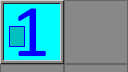
…

…

…

…

Scenes
Besides providing the player with visual information, a scene must lead somewhere in terms of navigation. There can't be dead ends (i.e. unusable cards).
Of course, one could scroll / zoom in reverse, back to the branching scene, but backtracking should be avoided in general. Instead, a terminal scene would either offer a shortcut to the main thread, or even turn into a brand-new branch (e.g. by masking), so the card isn't useless. This is also the standard strategy in Gorogoa.
A scene may have defined (square, clickable) areas for zooming in or unwrapping.
In the presence of an inventory, there may also be item drop zones defined.
Although navigation and modification features can be combined, there's a few restrictions to keep in mind:
- Since scroll-down-button as well as zoom-out-button claim the card's bottom center, a scene can't have both.
- Each scene is considered unique; that is, it must not be shown twice (in 2 cards) at the same time.
This may occur by inadvertently creating a self reference: say, card A splits (via unmasking) into B and C, where B can somehow turn back into A. Then, splitting that A again, a 2nd C could be produced.
- To simplify matters, a scene can contain only 1 item object.
Locks & Keys
There's a simple core concept in all ETRs / adventures: unlock a path by applying a suitable key.
The terms lock and key don't have to be taken literally - most of the time, the lock stands for any kind of problem, and the key is a way to solve it. This is factually true for all puzzle games, perhaps even games in general.
Minimal structure:
Start -- Key 1 -- Lock 1 -- End
Interwoven:
Start --+-- Lock 1 -- Key 2
        |
        +-- Key 1 -- Lock 2 -- End
Objects
Distinct entities inside a scene, most of which can be moved / animated by dragging the card.
Via masking, some have to be extracted, and then either inserted into a different scene, or combined with another isolated object to create a new entity, ready to be added to a scene later on.
If an inventory is present, some objects may (upon clicking them) turn into an item.
Inventory
Traditionally, this area is used to store items.
It has a capacity of 14 elements.
Items
These (60 × 60 px images) represent objects that the player has removed from a scene.
Sooner or later, each item will be dragged into a dedicated scene area to either place it there, or hand it over (e.g. to a person).
Alternatively, items may be combined inside the inventory to produce an item with new functionality.
Appendix :: Gallery
